OneCard Around You: The Offline Offers Feature Most Users Never Use
Most credit card offers are built for online shopping. Around You is different: it surfaces exclusive, location-aware deals at physical stores near you right now. Restaurants, fuel stations, grocery stores, airports. Stack it with 5X rewards on the same transaction and you have one of the most rewarding offline spend setups available on any Indian card.
OneCard rebuilt its app around four tabs: Store, Offers, Spends and Manage. In practice most of what you need surfaces on the dashboard rather than inside those tabs. You will find Around You at the bottom of the dashboard. Older guides, including earlier versions of this page, said Offers → Around You. That menu is gone.
Worth knowing: the entry point at the bottom of the dashboard does not look tappable. It reads as a heading rather than a link, which is almost certainly why so many cardholders say they have never found this feature. Tap it anyway.
Checked in the app in August 2026. If it moves again, tell us.
What is Around You, and why is it different?
Around You is a location-based offers feature built into the OneCard app. Unlike the standard Offers section, which shows deals tied to brands, spending thresholds, or online merchants, Around You specifically surfaces physical stores near your current location that have active OneCard offers.
The mechanic is intentionally simple. Open the feature, see what is near you, activate the offer you want, and pay before the timer runs out. No promo codes, no billing cycle tracking, no delayed credits. You activate when you are already near the store, not days in advance when you might forget.
What makes it genuinely unique is the offline-first design. Nearly every other Indian credit card's offer ecosystem is built around online transactions: Amazon, Flipkart, Swiggy, Zomato. Around You is one of the few features built explicitly for the physical world, where the majority of Indian consumer spending still happens.
What categories are available?
Around You covers six main merchant categories, with offers varying by city and by what is available near your location at any given time:
The offer inventory varies significantly by city. Metro users (Mumbai, Delhi, Bengaluru, Hyderabad, Pune, Chennai) will see a larger and more consistent set of offers. Smaller cities may have a thinner selection, particularly for retail and dining. Fuel offers tend to be the most widely available across geographies.
How to use Around You, step by step
You can only have one Around You offer active at a time. If you want to switch to a different offer, deactivate the current one first, then activate the new one. The deactivation is instant and does not count against you. Plan ahead if you are visiting multiple merchants.
The stacking advantage: Around You + surcharge waiver
The most powerful thing about Around You is that the offer valueback stacks on top of whatever else applies to that transaction. For fuel, that means Around You plus the 1% fuel surcharge waiver, credited separately on the same transaction. Here is what a fill looks like, with the parts we can state and the part only the app can tell you:
Two features working together, at any pump in the country: the Around You offer and the fuel surcharge waiver. Every issuing bank caps the waiver at ₹400 a month and does not waive the GST on the surcharge, so on heavy fuel spend the waiver stops mattering long before the offer does. Fuel earns no standard reward points; the offer is the whole story, and it is only there when an offer is live.
Around You offer valueback and regular 5X (or 1X) rewards apply simultaneously to the same transaction. There is no either/or: both credits hit your account instantly when the transaction goes through.
Fuel offers have the same 5–30 minute activation window as other Around You offers. For best results, activate the offer when you are already at the fuel pump, not while driving in. This ensures the window does not expire before your transaction completes. The 1% fuel surcharge is a separate charge and is not covered by the Around You offer; only the valueback applies.
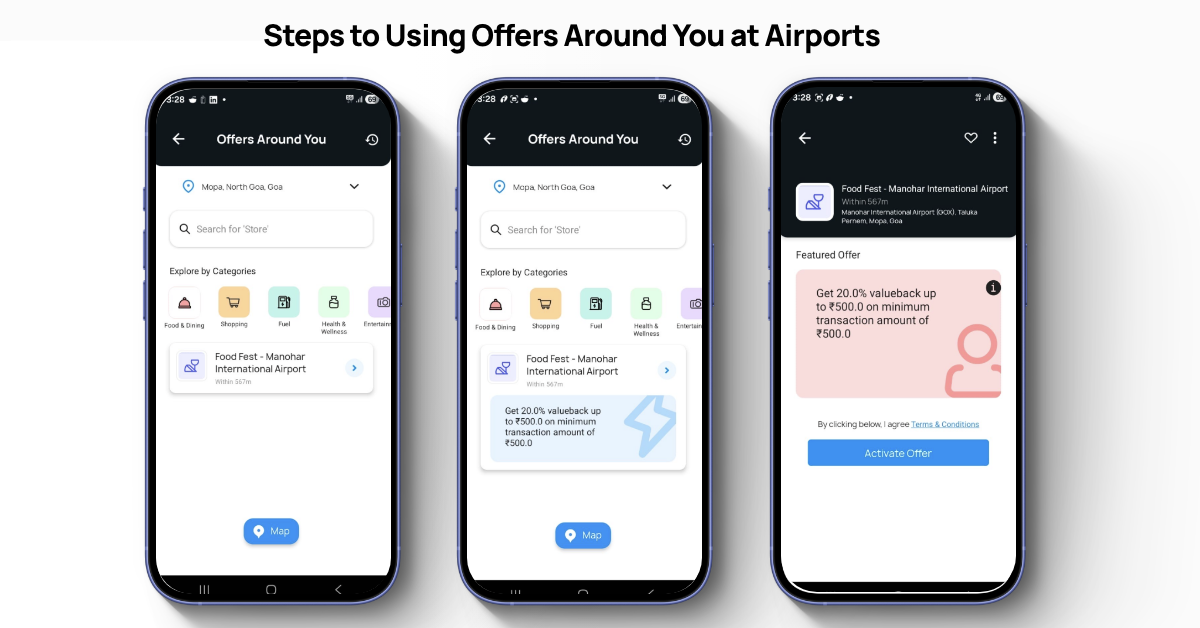
Using Around You at airports
Airports are a dedicated category in Around You. The feature surfaces active offers across merchants anywhere within the airport: food courts, retail outlets, cafes, and lounges. You do not need to be at a specific terminal or gate.
This makes OneCard particularly useful during transit. Open Around You when you arrive at the airport, activate whatever offer is available near your departure gate, and earn while you wait. Given that airport food and retail prices are typically elevated, having a percentage valueback on those transactions is a meaningful offset.
Most users assume Around You at airports only covers food and dining merchants. It does not. Because the airport itself is geo-tagged as a zone, Around You offers can apply to any merchant inside the terminal: retail stores, pharmacies, bookshops, and more. Open Around You once you are inside and check what is available. You may be surprised at what qualifies.
Around You uses your real-time location. For the most accurate and relevant offers, open the feature once you are physically inside the airport. Activating from outside may show fewer or different offers than what is available at your specific terminal.
Around You at movie theatres
The Entertainment category in Around You covers multiplexes and cinema chains. This is one of the least-known uses of the feature, and one of the most satisfying.
Around You offers at cinemas extend beyond the ticket counter: they apply at the concession stand too. Activate your offer before you hit the food queue, not just when you are buying tickets. Overpriced movie snacks just got a little less painful.
Fuel with Around You vs dedicated fuel credit cards
A fuel co-brand card pays a fixed rate on every fill, usually only at one brand's pumps and often with an annual fee. Around You works at any pump, costs nothing, and pays only when an offer is live. We have not checked the fuel cards' terms, so we do not quote their rates here; compare a card's published rate with the offers your app shows over a month before switching.
The honest verdict on fuel
- Fill at different pump brands or whichever is nearest
- Want a lifetime-free card with no annual fee eating into savings
- Spend across categories (dining, grocery, travel), not just fuel
- Want the 1% surcharge waiver stacked with Around You offers on fuel
- Fill a lot every month, consistently at the same brand
- Want consistent returns on every fill, not offer-dependent
- Are loyal to BPCL, HPCL, or IOCL exclusively
- Don't mind paying an annual fee for predictable savings
For most OneCard users who are not heavy, brand-loyal fuel spenders, Around You eliminates the need for a dedicated fuel card entirely. The combination of no annual fee, any-pump flexibility and Around You offers on top of the surcharge waiver is hard to beat, as long as you check the app for an offer before you fill.
The bigger picture: OneCard rewards the offline life
Around You is not a gimmick. It is the clearest expression of what OneCard is actually built for: rewarding people who live in the physical world.
Fuel at any pump. Grocery runs. Airport shops. Movie nights. Pharmacy visits. These are the everyday transactions that most credit cards either ignore or reward poorly. Around You turns them into the highest-value moments on the card.
The users who get the most out of OneCard are not the ones chasing online cashback or gaming reward categories. They are the ones who check Around You before they leave the house, and find that their card is working harder than any premium card they own.
What Around You does not do well: honest limitations
No feature is perfect. Here is what to keep in mind:
Offer availability varies: Not every merchant near you will have an active offer. The inventory is dynamic: what is available today may not be there tomorrow. Do not assume an offer will always be there.
Activation window pressure: The 5–30 minute window means you should only activate when you are ready to transact. Activating while browsing and then not making it in time wastes the offer opportunity.
Location required: The feature requires active location access. It may not function as expected on WiFi-only connections or in areas with poor GPS signal.
Fuel offers are the most reliable: Dining and retail offer availability depends heavily on your city and which merchants have partnerships with OneCard at any given time.
Related guides on Card Fine Print
Frequently asked questions
Around You is a feature in the OneCard app, found at the bottom of the dashboard since the May 2026 update, that shows exclusive, location-based cashback offers at physical stores near you: restaurants, fuel stations, grocery stores, retail shops, and airport merchants. You activate the offer in the app, visit the store within the activation window, and pay with your OneCard to earn the valueback.
Yes. Around You offer valueback and your regular 5X (or 1X) rewards both apply simultaneously to the same transaction. Reward points from both are credited instantly.
It depends on the offer. Each Around You offer sets its own percentage, and the app shows it before you activate. We do not quote a range: offers change, and no issuer document states one. Separately, every issuing bank waives the 1% fuel surcharge, capped at ₹400 a month, and the GST on the surcharge is not waived. Fuel earns no standard reward points.
The activation window varies by offer, typically between 5 and 30 minutes. Always check the timer shown before activating. Only activate when you are physically near the merchant and ready to transact.
Yes. Airports are a dedicated category in Around You. Offers are available across all airport merchants: food courts, retail, cafes, and lounges. Open the feature once you are inside the airport for the most relevant results.
Possibly not, but we will not put numbers on it. Around You works at any pump when an offer is live; a fuel co-brand card pays a fixed rate, usually at one brand's pumps. We have not checked those cards' terms, so we do not quote their rates. If you fill a lot at one brand, compare that card's published rate with the offers your app shows over a month.
Instantly, at the moment of the transaction, the same as regular OneCard rewards. You do not need to wait for the billing cycle to close.
No. Only one offer can be active at a time. If you want to use a different offer, deactivate the current one first, then activate the new one. Deactivation is instant.
Yes. The Entertainment category covers multiplexes and cinemas. Importantly, offers are not limited to ticket purchases; they also apply at the concession stand. Activate before you reach the food queue.
Yes. Because the airport is geo-tagged as a zone rather than a specific merchant, Around You offers can apply to any merchant inside the terminal: retail, pharmacy, and more. Open Around You once you are inside the airport to see what is available.
Was this article helpful?
Found this useful? Share it.
Still have questions?
Tap a question for an answer straight from the issuers' documents, or ask your own.